Direct Answer
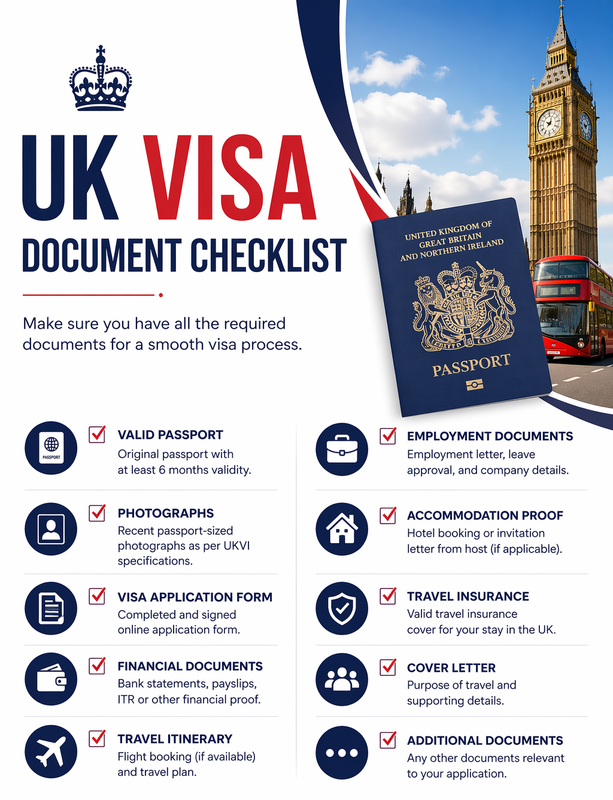
To apply for a UK visa, you must provide specific documents to support your application. These documents vary depending on the type of visa you are applying for. This guide outlines the general requirements and steps to prepare and upload your documents correctly.
Key Points
- Check the specific visa guide for your visa type to identify required documents.
- Prepare your documents by scanning or taking clear photos.
- Upload your documents through the online application form or a commercial partner website.
- Ensure all documents are legible and meet the file type and size requirements.
General Document Requirements
While the specific documents required vary by visa type, some general documents are commonly needed:
- Valid passport or travel document.
- Proof of financial means to support yourself during your stay.
- Evidence of accommodation arrangements.
- Details of your travel plans, including return or onward journey.
For more detailed requirements, refer to the specific visa guide for your visa type.
Preparing Your Documents
To ensure your documents are accepted, follow these steps:
- Scan or take a photo: Use a scanner or a smartphone camera to create a clear, legible image of each document.
- Check the lighting: Ensure the area is well-lit to avoid shadows or glare.
- Focus on the document: Make sure the document is in focus and all information is visible.
- Save the file: Save the image as a JPEG, PNG, or PDF file. Give each file a descriptive name, such as ‘bank-statement-2024’.
Uploading Your Documents
Once your documents are prepared, follow these steps to upload them:
- Access the application form: Log in to your UK visa application account.
- Navigate to the evidence section: Find the section where you need to upload your documents.
- Click ‘upload evidence’: Select the type of document you are uploading.
- Choose the file: Click ‘choose file’ and select the document from your device.
- Check your upload: Ensure the document appears under the ‘Files added’ heading. Repeat for each document.
Frequently Asked Questions
What if I don’t have a scanner?
If you don’t have a scanner, you can take a clear photo of your document using a smartphone or digital camera. Ensure the photo is well-lit, in focus, and all information is visible. Save the photo as a JPEG, PNG, or PDF file.
Can I upload documents after submitting my application?
No, you cannot upload additional documents after submitting your application. Ensure all required documents are uploaded before you submit.
What file types are accepted?
Accepted file types include JPEG, PNG, and PDF. Ensure your documents are saved in one of these formats before uploading.
Do I need to translate my documents?
If your documents are not in English or Welsh, you must provide a certified translation. Check the specific visa guide for your visa type to confirm translation requirements.
What if I need help uploading my documents?
If you need help uploading your documents, you may be eligible for Assisted Digital support. Contact Assisted Digital for further advice if you do not feel confident using a computer or mobile device, do not have internet access, or do not have access to a device like a laptop or smartphone.
Can I use the self-upload service if I have my fingerprints and photograph taken at a visa application centre?
No, you cannot use the self-upload service if you have your fingerprints and photograph taken at a visa application centre (VAC) or UK Visa and Citizenship Services (UKVCAS) service point. You can upload documents using our commercial partner websites instead, or pay for an Added Value Service to submit your documents at your appointment at a visa application service or UKVCAS service point.
Disclaimer: This guide provides general information only and is not individual legal advice. For specific advice, please consult with a qualified immigration adviser. For more information on our services, visit our services page.